
Building a Custom WooCommerce to Reach360 Integration with Zapier Webhooks
Overview
One of my recent projects involved integrating a WooCommerce store with Reach360, a learning management system (LMS), to automatically enroll customers into training groups immediately after purchasing a course.
Although both platforms provide APIs, there was no native integration available. The objective was to create a reliable automation that connected the two systems while requiring little to no ongoing maintenance.
The Problem
The goal was that whenever a customer purchased a specific WooCommerce product, they should automatically be enrolled in the corresponding Reach360 learning group without requiring any manual work.
Because Reach360 doesn’t provide a direct WooCommerce integration, the workflow needed to bridge multiple platforms while ensuring customer information was transferred accurately.
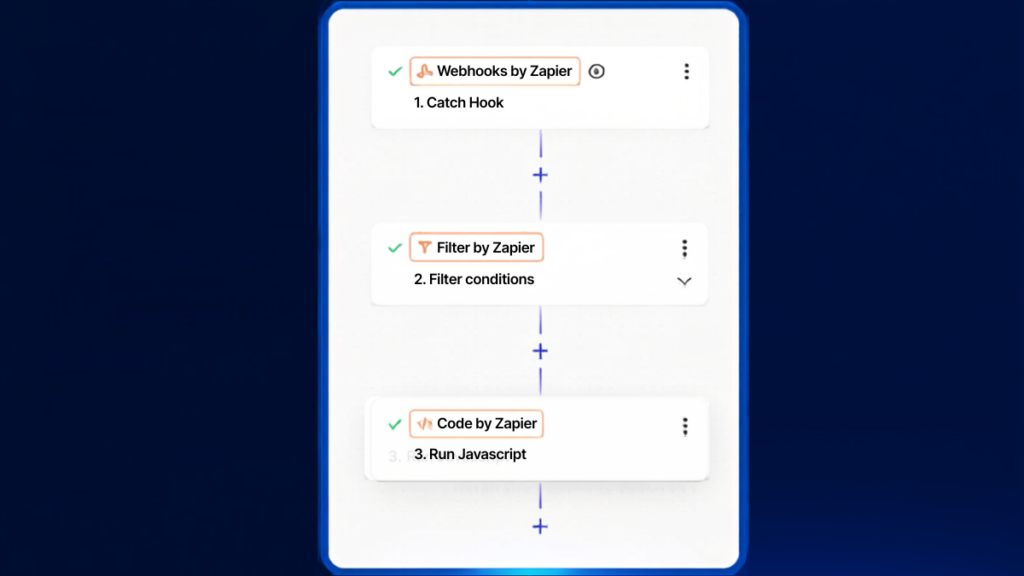
The integration was built using Zapier’s Webhooks feature as the middleware between WooCommerce and Reach360.
The workflow included:
- Triggering a Zap from a WooCommerce webhook whenever a qualifying order was completed.
- Parsing the webhook payload to extract customer information such as name, email address, purchased products, and custom metadata.
- Filtering orders to determine which Reach360 group the customer should be added to.
- Authenticating with the Reach360 API.
- Sending a custom API request to automatically enroll the customer in the correct learning group.
- Returning success and error responses for easier troubleshooting.
The finished automation eliminated the need for manual user enrollment and ensured customers received immediate access to their purchased training content.
Beyond saving administrative time, the integration also reduced the possibility of human error and created a much smoother customer experience.
Parsing the WooCommerce Webhook
One challenge was that the webhook payload contained a large amount of nested JSON. While WooCommerce exposes standard customer information, this project also relied on custom metadata added to the order. Instead of manually traversing arrays throughout the Zap, I wrote a JavaScript step in Zapier to normalize the payload into a much simpler structure.
The script converted the meta_data array into a key/value object, extracted the custom learner information, collected the purchased product IDs, and returned only the values needed by the remaining Zap steps.
// Parse the incoming JSON string
const order = JSON.parse(inputData.webhook_JSON);

// Convert meta_data array into key/value object
const meta = Object.fromEntries(
  (order.meta_data || []).map(item => [item.key, item.value])
);

// Extract the three values
const email = meta["_product_user_email"] || "";
const firstName = meta["_product_user_first_name"] || "";
const lastName = meta["_product_user_last_name"] || "";

// Extract line item PRODUCT IDs
const productIds = (order.line_items || []).map(item => item.product_id);

// Return everything
return {
  product_user_email: email,
  product_user_first_name: firstName,
  product_user_last_name: lastName,
  line_item_product_ids: productIds
};
This approach made the rest of the automation significantly cleaner. Instead of repeatedly navigating nested JSON paths, every subsequent Zap step could reference simple output variables.
The result was a workflow that was easier to read, debug, and extend as additional courses and product mappings were added.
Calling the Reach360 REST API
Once the webhook data had been normalized and the purchased product mapped to the appropriate Reach360 learning group, Zapier issued an authenticated HTTP request to the Reach360 REST API to enroll the learner.
A simplified request looked like this:
POST /users/{userId}/groups
Authorization: Bearer YOUR_ACCESS_TOKEN
Content-Type: application/json
{
"groupId": "12345"
}Zapier’s Webhooks by Zapier action handled the authentication, headers, and JSON body, allowing the entire enrollment process to complete within seconds of a WooCommerce purchase.
The integration also validated the API response before continuing so failed enrollments could be identified immediately rather than silently ignored.
For developers interested in building similar integrations, the Reach360 REST API documentation provides endpoint references, authentication details, and example requests:
Example API Requests: REACH API Example Calls
These resources include sample requests, authentication methods, and response formats that were useful when validating the integration.
Projects like this demonstrate how flexible automation platforms such as Zapier can become when paired with custom webhooks and APIs. Even when two platforms don’t offer an official integration, it’s often possible to build a reliable connection using webhook events, data transformation, and API requests.
In Conclusion
This project was a great example of solving a real-world business problem by combining WordPress, WooCommerce, Zapier, REST APIs, and custom webhook automation into a seamless workflow.